Dashboard Example

bt_bb_section_bottom_section_coverage_image

AR Requirement Overview

Sources of AR Supply

Aging Analysis

Collection Effectiveness

Essential KPIs for an Effective Accounts Receivable Dashboard

https://netvironit.com/wp-content/uploads/2024/11/Account-Receivable-KPI.png

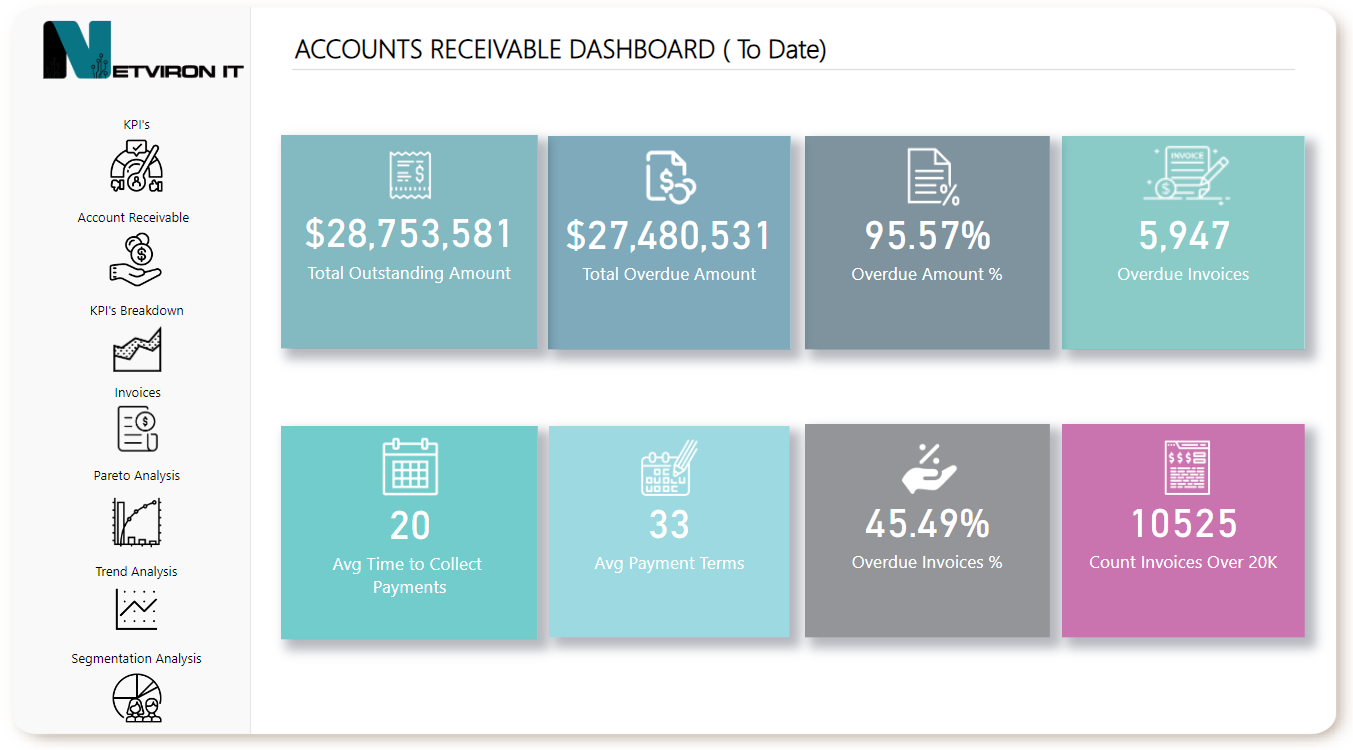
Account Receivable KPI Dashboard
This dashboard provides a high-level view of key metrics related to accounts receivable, such as total outstanding balances, average Days Sales Outstanding (DSO), and collection effectiveness. It helps businesses monitor their financial health and streamline the cash collection process.

KPI Breakdown
A detailed analysis of individual key performance indicators (KPIs), breaking down metrics like overdue balances, collection rates, and payment patterns. This section allows for a more granular understanding of AR performance and highlights areas for improvement.

Invoices
A summary of all invoices, categorized by status (e.g., paid, pending, overdue). It includes information such as invoice amounts, due dates, and customer details, helping the AR team manage and prioritize collections effectively.

Pareto Analysis
An analysis based on the 80/20 rule, showing which customers or invoices account for the majority of outstanding balances. This helps prioritize collection efforts on the most significant accounts to maximize impact.

Trend Analysis
Tracks changes in AR metrics over time, such as the trend of overdue balances or average DSO. This analysis helps identify patterns, forecast future cash flow, and adjust collection strategies accordingly.

Segmentation Analysis
Groups accounts receivable data by various segments, such as customer type, region, or payment terms. This breakdown provides insights into which segments contribute most to overdue payments and helps tailor collection strategies to different customer groups.

What is An Account Receivable?

Accounts receivable (AR) refers to the money a company expects to receive from its clients for goods or services sold on credit. In other words, it is the amount billed to customers but not yet collected.

When an invoice is paid, the company's cash account is credited, and the accounts receivable account is debited to reflect the payment.

AR is a critical key performance indicator (KPI) for assessing a company’s cash flow and profitability. It serves as a reliable measure of revenue and is considered an asset on the balance sheet because it represents incoming funds.

To evaluate profitability, a company calculates the total of all its assets, including accounts receivable, and subtracts its liabilities, which consist of debts owed to suppliers and vendors.

If the result is positive, the business is profitable. If it is negative, the company must either increase.

What is an Account Receivable Dashboard?

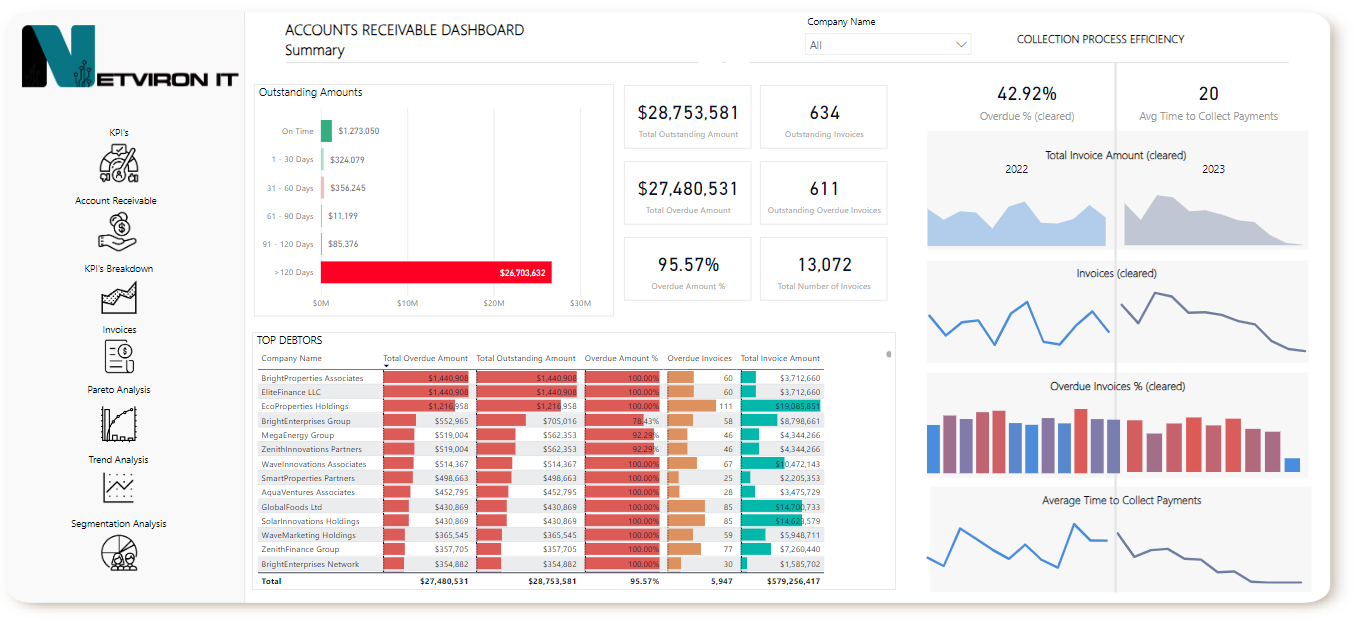
An accounts receivable dashboard is a visually organized tool used to track, analyze, and manage accounts receivable activities through key performance indicators (KPIs).

It provides team members with a clear and comprehensive overview of all AR activities in one place.

The dashboard pulls data from transaction systems, such as billing software or ERP systems, offering insights into customer payment behaviors and trends. It enables the AR team to quickly and efficiently address customer concerns and respond to late payments.

When selecting accounts receivable software with a dashboard, it should provide the capability to drill down into key performance areas for deeper analysis and effective management:

• Current AR Aging Reports

• Invoice management

• Average days to pay

• A cash flow

• Top delinquent accounts

• Summary of payment collection activities

• Summary of customer payments

• Projected cash receipts
https://netvironit.com/wp-content/uploads/2024/11/Account-Receivable-Summary.png

Why Tracking Accounts Receivable is Crucial for Your Business?

Keeping track of accounts receivable is crucial to ensure your business operates smoothly and maintains a healthy cash flow. Without proper tracking, you may forget to bill some clients or be unaware of unpaid invoices, which could significantly impact your revenue and financial stability.

If you fail to send invoices promptly, the likelihood of receiving payment decreases, affecting your cash flow and potentially hindering your ability to cover business expenses. Additionally, accurate records of accounts receivable provide essential documentation of income for tax purposes, ensuring compliance and making financial reporting more straightforward.

Key Benefits of an Accounts Receivable (AR) Dashboard

An accounts receivable (AR) dashboard is a powerful graphical tool that helps businesses track and manage their receivables efficiently. It offers a real-time view of outstanding payments, sales progress, and Days Sales Outstanding (DSO), while also allowing teams to zoom in on specific invoices and client accounts. Here are some key benefits of an AR dashboard:

1. Real-Time Updates
Without automation, businesses may delay calculating new KPIs for weeks or months, leaving managers in the dark. With real-time data provided by an AR dashboard, potential financial issues can be identified and addressed before they escalate.

2. Accurate Information
The dashboard ensures data accuracy by automatically updating accounts receivable information. This reduces errors and eliminates the hassle of managing manual reports and spreadsheets prone to mistakes, freeing up the team to focus on more strategic work.

3. Granular Insights
An AR dashboard breaks down data into more manageable parts, helping to uncover trends, patterns, and problem areas. Managers can use these insights to compare performance metrics and better understand how their team is performing.

4. Improved Performance
With real-time data at their fingertips, managers can reprioritize tasks or adjust strategies on the fly. This agility allows them to quickly respond to changes in customer payment behavior, minimize non-value-added activities, and boost team productivity.

5. Team Motivation
Dashboards make it easy to highlight both team and individual accomplishments. Recognizing outstanding performance fosters a sense of achievement and creates a healthy competitive environment. Additionally, automating calculations can boost team morale by eliminating tedious manual work.

6. Improved Cash Management
By offering insights into cash flow, the AR dashboard enhances overall cash conversion and expense management. Managers can identify clients who are slow to pay, optimize collection efforts, and make informed decisions about extending credit terms or pursuing other actions to improve cash flow.

Key Accounts Receivable (AR) KPIs to Monitor

Businesses use an accounts receivable (AR) dashboard to track and manage client payments and outstanding balances effectively. Here are some essential AR dashboard metrics that organizations should monitor to optimize cash flow and collection processes:

1. Outstanding Balances
This KPI shows the total amount of unpaid or overdue debts owed by customers. It helps prioritize collection efforts by identifying which customers or invoices should be addressed first.

2. Days Sales Outstanding (DSO)
DSO measures the average number of days it takes for a business to collect payments from clients. A high DSO indicates delays in collections, which can negatively impact cash flow.

3. Collection Efforts
This metric tracks the number of collection activities, such as calls, emails, or letters sent to clients. It can also show the effectiveness of these efforts by indicating the percentage of overdue amounts successfully collected.

4. Invoice Outstanding Aging
This KPI categorizes unpaid invoices based on how long they have been overdue, such as 30, 60, or 90+ days. It helps identify which clients are significantly behind and may require more aggressive collection actions.

5. Cash Flow Forecast
This metric project future cash flows over a specific period, like the next month or quarter. It helps businesses anticipate cash shortages and adjust their AR collection strategies accordingly.

These KPIs can be customized to meet a company’s specific needs and can be visualized on an AR dashboard using graphs, tables, or charts for easy analysis and decision-making.

Tips for Designing an Effective Accounts Receivable (AR) Dashboard

Creating a successful AR dashboard can help you monitor collection efficiency, improve cash flow, and maintain your company’s financial stability. Here are some essential tips to consider:

1. Identify Key Performance Indicators (KPIs)
Determine the most critical metrics for your business, such as unpaid balances, Days Sales Outstanding (DSO), collection efforts, customer aging, and cash flow forecasts. Focus on KPIs that will significantly impact your collection strategies and cash flow improvement.

2. Utilize Clear Visualizations
Utilize visual elements like charts, graphs, and tables to present data in an easy-to-understand format. Choose visualizations that can be customized to highlight trends, patterns, and anomalies, making the data clearer and more actionable.

3. Set Clear Goals and Targets
Establish specific objectives for each KPI and track your progress toward these targets. This will help you identify areas that require more attention and ensure continuous improvement in collection performance.

4. Provide Relevant Context
Include historical trends, industry benchmarks, and comparative data to give your metrics more meaning. This context allows you to see how your business performs relative to industry standards and highlights areas for improvement.

5. Monitor and Adjust Regularly
Review your AR dashboard frequently and adjust your collections strategy as needed. Use insights from the dashboard to detect trends and address potential issues before they escalate, ensuring proactive management.

6. Automate Data Collection and Reporting
Implement technology, such as accounting software, to automate the data collection and reporting process. Automation saves time, reduces errors, and ensures your data is accurate and up-to-date.

By following these tips, you can create an AR dashboard that provides valuable insights and supports your company’s financial health.

Why Choose Netviront IT?

Comprehensive BI Development: With extensive experience creating business-centric reports and dashboards, we ensure that metrics and analytical tools align with organizational goals and drive actionable insights.

Efficient Project Management: We bring strong experience in requirements gathering, data management, and data integrity testing. Our disciplined project management keeps analytics projects on time and within scope, providing complete, accurate, and accessible insights.

Customizable BI Architecture: From metrics to transformations, we’ve developed BI architectures tailored to specific needs, using industry-leading tools such as SQL Server, Snowflake, Power BI, Tableau, Oracle Analytics Cloud and OLAP. Our solutions prioritize flexibility and scalability, adapting to your unique environment and growing needs.

Advanced Data Integration with Power BI Services: We’ve deployed both Enterprise and Personal gateways, making reporting streamlined and accessible. This approach improves data transparency and accessibility across your team, fostering collaborative decision-making.

Technical Expertise: Our expertise includes SQL, Python, R, Snowflake, SQL Server, Tableau, Salesforce, Oracle Analytics Cloud and Power BI. We use these tools to build a robust analytics foundation that addresses complex data requests with precision.

Let’s schedule a brief call to discuss your goals in more detail—I’m confident that our expertise in BI, data architecture, and project execution can provide the support you’re looking for, please contact us.
https://netvironit.com/wp-content/uploads/2020/08/floating_image_15.png
https://netvironit.com/wp-content/uploads/2020/08/floating_image_14.png

Your goals are unique, and we believe business advice should be tailored to match.

Connect

We leverage our extensive global experience and resilience to guide our clients through new and often disruptive challenges